
Where to see what went wrong
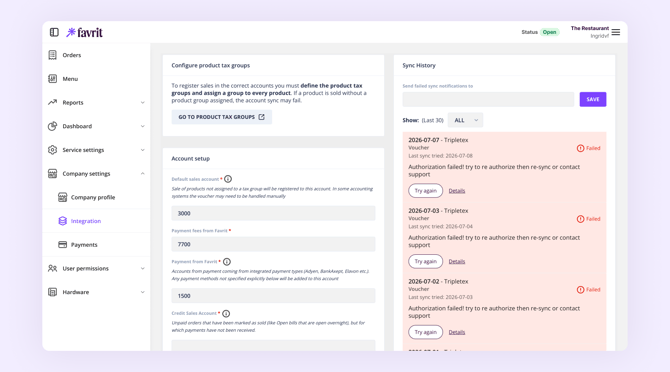
When a sync fails, Favrit sends you an email and shows the details in Admin under Company Settings → Integration → your accounting integration. Open that page first: it tells you which products or accounts caused the error, which points you to the right fix below.
A product is missing a VAT (tax) group
This is the most common cause. If a product isn't linked to a VAT group, its sales can't be mapped to the correct account, so they fall to a default fallback account with the wrong VAT rate. You may see sales landing on accounts like "sales without an assigned VAT group" instead of where you expect them.
To fix it, open the product, assign the correct VAT group, and save. Once every affected product has a VAT group, the sync can go through.
The same account number is used in more than one place
When a number is duplicated, the integration can't resolve where an amount belongs and the sync fails. A common example is using the same account for both cash payments and cash withdrawals — put them on separate accounts. Check your product groups and account setup for unintended duplicates.
There's an extra space or typo in an account number
The number then isn't recognised in your accounting system, and the posting stops. Open the integration setup, check the account numbers, and remove any extra spaces before saving.
A product hasn't been created in the accounting system yet
If a product in Favrit points to an account or item that doesn't exist in your accounting system, that posting can't complete. Create the missing product or account in your accounting system, or map the Favrit product to an existing one that fits, then re-sync.
VAT is being calculated twice
Whether amounts are sent including or excluding VAT depends on the accounting system. Favrit sends amounts in the format the system expects, and some systems (such as XLedger) let you control this yourself in the integration setup.
VAT gets doubled when the products in your accounting system aren't set up to match how amounts are being sent — for example, VAT is added on top of an amount that already includes it. If you see this, check the VAT setting on the integration setup page (if your system has one) and make sure your products in the accounting system are configured to match.
The API key has expired or the user who created it lost access
Some integrations rely on an API key. When that happens, data stops flowing. Generate a new key in your accounting system, then enter it in Favrit's integration setup.
After you've fixed the setup
Fixing the setup doesn't backfill on its own — you need to resync the days that failed. You can do this yourself from the integration page in Admin, and the corrected postings will then go through.
The page shows only a recent window of postings, so if a sync has been failing for a longer period, or the resync itself returns an error, contact Favrit Support and we'll push the older days through for you.