
Where to find the Payout Statement
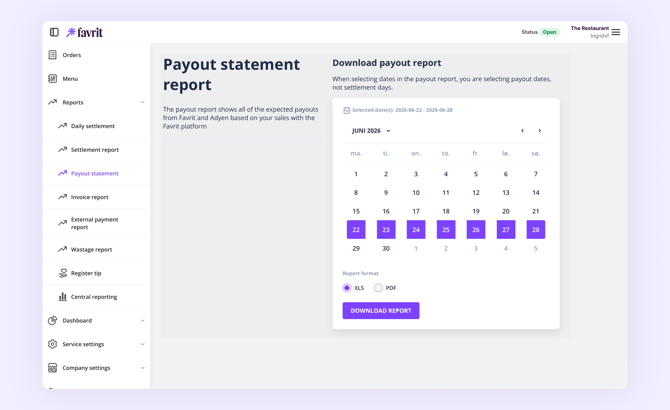
You find the Payout Statement in backoffice under Admin > Reports > Payout Statement.
You can download the report as an Excel file or a PDF. Note that when you select dates, you are choosing payout dates — the days money was sent to you — not the days the sales happened.
If you use F1 terminals, your card payouts are handled by Elavon. Log in to Elavon Connect to retrieve those payout reports.
What the report shows
At the top of the report you find your location ID and location name. The report then shows:
- Settlement periods — each period with its gross turnover, paid fees, and currency.
- Payouts — the amount paid, the date the payout was initiated, the estimated arrival date, and the IBAN (account number) the payout was sent to.
When payouts arrive
First, make sure you have completed the "Enable withdrawals from Favrit" check under Company Settings > Payments — without it, no payouts will be sent.
Payouts are generated one to three business days after the settlement period. Transfer speeds between banks differ, but the report estimates the arrival day.
The frequency of payouts:
- Norway, Denmark, and the United Kingdom: every weekday.
- Sweden: two payouts per week — one on Tuesday covering settlements from Thursday through Sunday, and one on Friday covering Monday through Wednesday.
All times in the report are in UTC, which is one or two hours behind local time in Norway depending on summer time or winter time. For example, a settlement period of 06:00–05:59 local time appears as 04:00–03:59 in the report during summer time.
Why a payout doesn't match the settlement report
The payout amount is usually the same as stated in the settlement report, with these exceptions:
- Payouts from Friday 06:00 to Monday 05:59 are combined into a single weekend payout.
- Payouts may also be grouped around bank holidays.
- Payments made close to midnight can be included in the next day's payout.
- Minor differences can occur due to rounding.
- There can be delays between the card issuer and Adyen.
- Refunds and chargebacks reduce the payout amount.
How to check a deposit against the report
If a deposit on your bank statement doesn't seem to match your sales:
- Note the amount and date of the deposit on your bank statement.
- Open the Payout Report and select a date range around that date. Remember you are selecting payout dates.
- Find the payout with the matching amount and check the estimated arrival date and IBAN.
- Compare the payout against its settlement period(s). One payout can cover several days — especially weekends and holidays — and the amount is the gross turnover minus fees for those periods.
- Remember that payments processed outside Favrit are never part of a Favrit payout (see below).
If there is still a difference you cannot explain, contact us at support@favrit.com — include your location ID, the payout date, and the amounts you are comparing.
Which payments are not in the report
The Payout Report only covers payments processed through Favrit. You will not find:
- Bill on Room payments — these are registered directly in your hotel's cashier system and captured when guests check out.
- Unintegrated payments — cash, external card terminals, and external channels like Wolt/Foodora. These are paid out by the respective provider, or handled by you directly.
- F1 terminal payments — paid out by Elavon; see Elavon Connect.
- Nets payments
Note: The creditor shown in the report is Adyen for locations in Denmark, the United Kingdom, and Norway, and Favrit for locations in Sweden. Before October/November 2021, Norwegian locations also had Favrit as creditor.