
What is Bill correction?
Bill correction is a built-in ePOS feature that lets you close a table with a remaining amount. It covers the most common scenarios: rounding differences, a payment made on another table, a failed invoice flow, and dine and dash.
Who can use the feature?
In Admin → User permissions → Access Levels you can set which access level is allowed to make corrections. Users on an access level without this permission won't see the button.
The feature is available on open tables where at least one payment has been registered but an amount still remains. Tables with no payments won't show the button — use Discard there instead.
How to do it
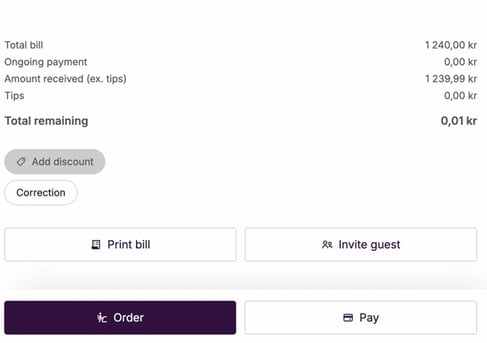
Step 1: Find the table and press Correction
Open the table in ePOS. Below the payment overview you'll find the Correction button, next to "Add discount".
Step 2: Choose a reason
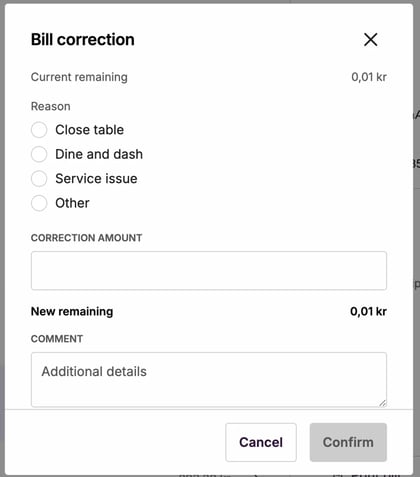
A dialog opens with four reasons:
| Årsak | Når brukes den |
|---|---|
| Close table | Betalingen er gjort, bordet skal bare lukkes. Vanligste valg. |
| Dine and dash | Gjest forlot uten å betale. |
| Service issue | Beløpet avskrives pga. et serviceproblem. |
| Other | Annen årsak. |
Step 3: Check the amount and confirm
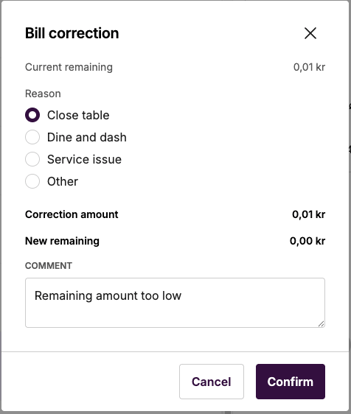
If you choose Close table, the correction amount is set automatically to the remaining amount. "New remaining" shows as 0.00 kr.
If you choose another reason, you can adjust the amount manually in the "Correction amount" field.
Feel free to add a comment for traceability, especially if the amount is large. Press Confirm, and the table closes immediately.
Common situations
| Situation | Reason to choose | Comment |
|---|---|---|
| Rounding difference (e.g. 0.01 kr remaining) | Close table | The amount fills in automatically. Press Confirm. |
| Paid on another table / direct sale | Close table | The amount fills in automatically. Press Confirm. |
| Failed invoice flow, rest paid another way | Close table or Service issue | Add a comment explaining the situation. |
| Guest left without paying | Dine and dash | Add a comment with details about what happened. |
When do you need to contact support?
Bill correction solves most cases, but there are two situations where you'll need help from us:
'Ongoing payment'
The table shows "ongoing payment" and you can't reach the payment overview with the Correction button. A payment is stuck mid-flow and is blocking the table. This must be reset by the Favrit team before you can run Bill correction.
Create a ticket and include the order reference (e.g. BNF72PKW) and a short description of what happened with the payment.
Payment registered on the wrong order reference
The amount has technically been paid on a different order and needs to be re-posted. In this case Bill correction would write off an amount that has actually been paid, causing errors in your reports.
Create a ticket and include both order references (the one it was wrongly registered on, and the correct one).
Where do you find the order reference?
| Information | Example | Where to find it |
|---|---|---|
| Order reference | BNF72PKW |
Admin → Order history |
| What happened with the payment | "Paid on direct sale, table stuck" | Check internally what happened |